Auto squash and stretch

Use a dedicated squash and stretch panel to add shape, impact, and follow-through without hand-building every scale keyframe. Auto squash keeps the animation editable as the design changes.
A motion engine for the AI era.
An animation app for the web: import real pages, draft editable motion with AI, and export production-ready code or video.
HTML Import
Import live website text directly into CurveLab as editable native text.
Paste a URL, preview the page, click any heading or paragraph, and CurveLab converts it into editable motion-ready text while preserving responsive sizing and line wrapping.
Animate it using the Text Animator. Export browser-native HTML, CSS, and JavaScript that stays real selectable text instead of SVG outlines or screenshots.
MCP
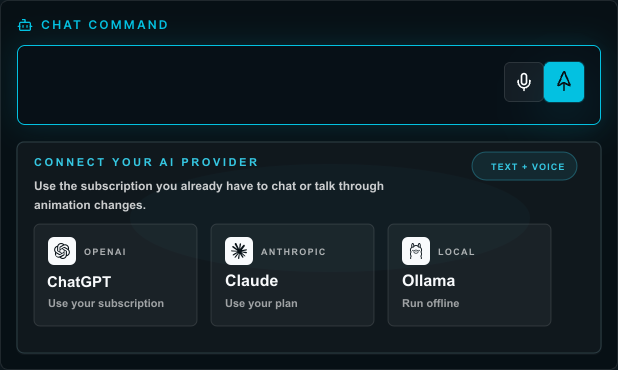
Connect ChatGPT, Claude, or Codex through MCP. Generate motion, refine timelines, and iterate with the AI assistant you already use.
Use ChatGPT, Claude, or Codex
Generate motion from the assistant you already use
Refine timelines without switching your workflow
Avoid being locked into one AI model
AI workflow
Describe the motion you want. CurveLab generates editable keyframes that you can refine, tweak, and combine with procedural animation using familiar timeline controls.
Nothing is baked into a video. Everything remains editable, from timeline timing to procedural systems.
Interactive Force Engine
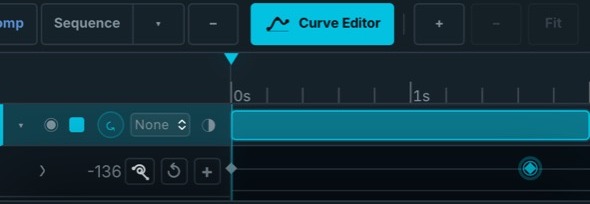
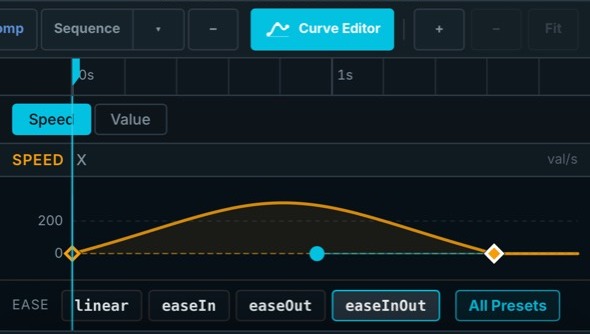
Create motion that responds to cursors, touch, physics, and user input. Generate interactive behaviors with AI, fine-tune every parameter, and export browser-native interaction code.
Export
Export production-ready HTML, CSS, and JavaScript designed for real websites. Animations remain browser-native, lightweight, selectable, and responsive.
Developer handoff
Download standalone files or copy an embed snippet. Keep text as real browser text, preserve responsive behavior, and hand developers motion that fits into the page.
Product demo
These demos map to the work CurveLab is built for: HTML import, Text Animator controls, SVG motion, interaction triggers, and developer-ready export.
Use a dedicated squash and stretch panel to add shape, impact, and follow-through without hand-building every scale keyframe. Auto squash keeps the animation editable as the design changes.
Bring in HTML sections, website text, buttons, cards, and product UI pieces so real web content can become editable motion layers.
SVG Explode
Import SVG logos, icons, loaders, and website elements, split them into workable parts, animate the pieces, then export portable motion.
Animate type with timeline-friendly controls, timing edits, and curve adjustments instead of hand-staggering every text layer.
Map hover, click, submit, and success states to motion, then hand off browser-native HTML, CSS, JavaScript, SVG, and embed snippets.
Why CurveLab
Import. Animate. Ship. CurveLab keeps prompts, curves, imported content, triggers, and developer handoff in one editable project so teams can move from page content to production motion faster.
Create motion for the places it will actually run: websites, landing pages, product UI, animated SVGs, and embeds.
Export HTML, CSS, JavaScript, SVG, standalone files, and embed snippets designed for real websites.
Import SVG logos, icons, loaders, website text, HTML sections, or product UI pieces instead of rebuilding the motion scene from a blank canvas.
Work visually with layers, timeline tracks, inspector controls, and a graph editor, then export production-ready web animation for the stack your team already uses.
Workflow
The difference is where the work starts and how it ends. CurveLab starts with real website content and ends with production-ready code.
Platform
Use CurveLab at curvelab.app when you want instant access. Sign into the macOS or Windows desktop app when a project needs local assets, longer sessions, or a dedicated workspace.
Launch pricing
Demo Mode is open for exploration. Pro is for ongoing web animation work. Lifetime is the launch-window option for teams that want CurveLab in the website and product UI toolkit.
For testing the timeline, value graph, sample project, and limited AI motion workflows.
Try Demo ModeMonthly Pro is $12/month for teams shipping website motion, product UI animations, and developer-ready handoff every week.
Lifetime is $79 one-time for agencies, power users, and anyone who wants the launch deal forever.
FAQ
CurveLab is intentionally focused. The goal is faster motion creation, faster iteration, and faster shipping across the places you already work.
CurveLab is for production-ready motion on websites and products. Import existing web content, animate it with editable timeline controls, and export browser-native code.
No. The HTML Import workflow lets you paste a URL, preview the page, click headings or paragraphs, and convert them into editable motion-ready text.
CurveLab exports production-ready HTML, CSS, JavaScript, SVG, standalone files, and copy-and-paste embed snippets.
No. AI can draft editable keyframes and timeline changes, but you can refine, combine, or author motion manually with the timeline, graph, and inspector.
Yes. CurveLab supports MCP so you can connect ChatGPT, Claude, or Codex and iterate with the assistant you already use.
Yes. CurveLab runs in the browser and has downloadable desktop apps for both macOS and Windows. Sign in to your CurveLab account to download the installer for your computer.
Yes. Demo Mode is free and built for testing the timeline, value graph, sample project, and limited AI timeline generation before upgrading.
Lifetime is a one-time launch license for full access forever with no recurring payment. It is designed for power users, studios, and agencies that want CurveLab in their permanent toolkit.
Email us at support@curvelab.app. For the fastest diagnosis, include your account email, what you were trying to do, and any relevant screenshots or error messages.
Launch close
CurveLab gives web teams a faster way to prompt, edit, trigger, and export animation for animated SVGs, product UI motion, landing pages, embeds, and developer handoff.